
Still arranging every sticker by hand? MagLab turns it into one click
An illustrative product profile based on public product information; this is not a customer testimonial.
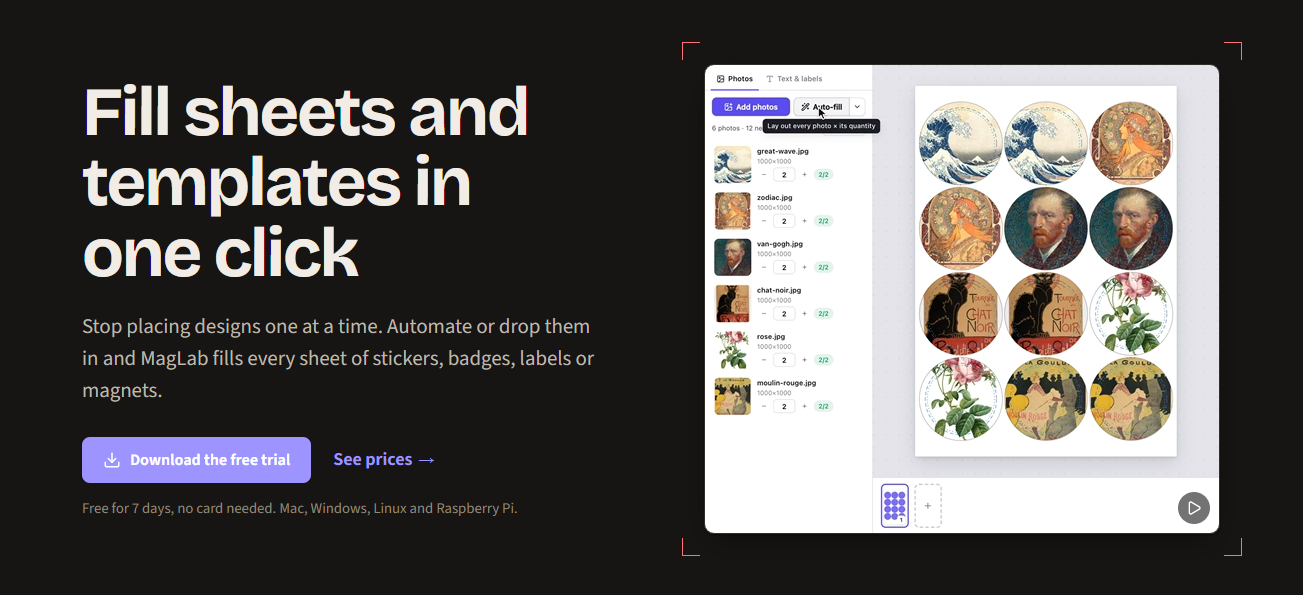
A small print shop gets an order for custom stickers. Then another. Soon the artwork is ready, but every job still means downloading files, checking quantities, laying copies onto a sheet, and sending the right file to the printer. The creative work is done; the repeat handling is eating the afternoon.
Where a small shop loses time
A design editor helps make the artwork, and a spreadsheet can track quantities. Neither necessarily arranges several designs into a print-ready sheet or keeps repeat orders moving. Bigger print-shop systems may be more than a small handmade business needs. MagLab focuses on the step between finished artwork and the printer.
Arrange the sheet, then print or export
MagLab’s website describes desktop software for stickers, badges, labels, magnets, business cards, and photo prints. Add artwork, set quantities, and use Auto-fill to place designs on a sheet. The layout can be printed at its intended size or exported as a PDF, PNG, or SVG cut file.
For shops ready to automate repeat jobs, MagLab Pro can receive orders through Shopify, scheduled feeds, webhooks, hot folders, or a local API. It can lay out the work, route different materials to different printers, and update the shop when printing is complete. The product site lists Mac, Windows, Linux, and Raspberry Pi support.
A focused tool for production work
MagLab is not another place to create the artwork, and it does not do the physical cutting. Its job is to reduce the handoffs between artwork, order details, templates, and printers. A maker can start with manual sheet layouts, reuse templates, and add automated order handling if the workload calls for it.
Try it with a real batch
Start with a few jobs you already know how to print. Check the sheet dimensions, quantities, and printer calibration before relying on a saved template. Then try a repeat order and see whether the setup removes enough manual steps to matter in your shop.
Learn more about MagLab
For the latest product details, visit the maker’s official website or store listing.
Visit MagLab’s website ↗Find products worth trying
Explore early products, meet the people building them, and discover deals from small developers in Demand Lab.
Explore Demand Lab ↗